Thread the chart in the order your hands work it
Order mode lets you set the bead stringing order yourself. Tap beads in the order they go on the needle, drag across a run, pass back through a bead, and close each pickup as a step. Make mode, read-only links, and the printed pattern then follow your path instead of a generic row order.
No credit card required
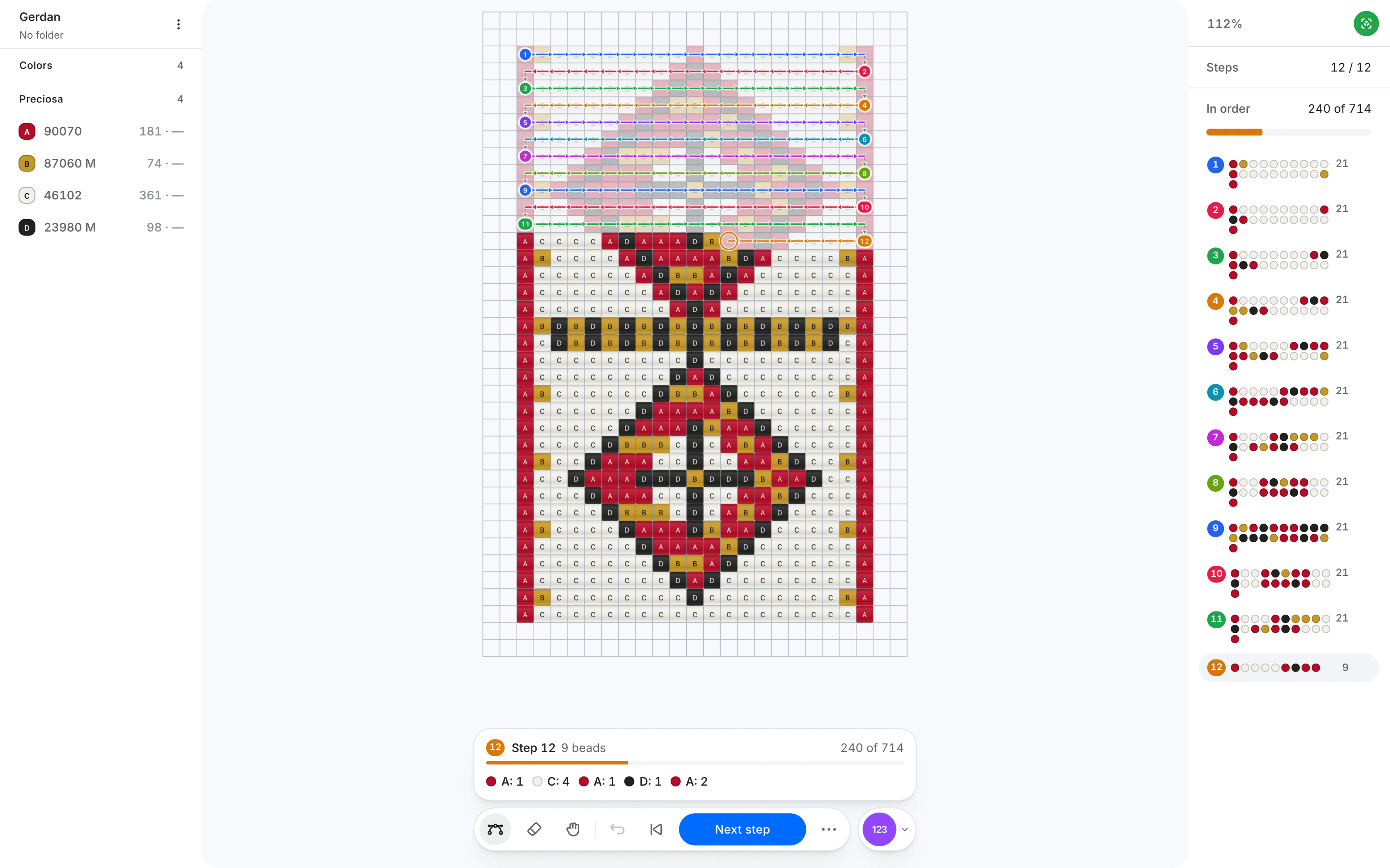
The order the beads go on is part of the pattern, so you draw it on the chart instead of explaining it in a paragraph.
See the thread path. Arrows run along every step, so the direction of the needle sits on the chart, bead by bead.
Pass back through a bead. Tap a threaded bead again to cross through it. Make mode reads it as Cross A, never as one more bead to pick up.
Start from the standard order. Load the weave's usual order, then rethread only the steps you work differently.
Built for the pieces where a plain row-by-row reading would teach the wrong path.
Sylianka and netted lace. Thread each loop the way you were taught, with the crossings exactly where the two needles meet.
Brick stitch, earrings, and 3D peyote. Record ladder starts, decreases, step-ups, and the rounds of pods, stars, and balls, so the shape is worked in your sequence.
Gerdan and loomwork. Show which way each row is strung and where the needle turns, so a buyer's rows match yours.
Thread the order once and every way you hand the pattern on follows the same path.

Draw the chart
Design with real catalog beads in Draw mode, exactly as you do now.
Thread it in Order mode
Switch modes, tap the beads in working order, and press Next step to close each pickup.
Make, share, or print it
Make mode, read-only Make links, marketplace copies, and the PDF's working-order pages all follow your steps.
Answers about bead stringing order, pass-throughs, sylianka, sharing, and printing the working order.
What is Order mode in Wevy?
Order mode is where you set the sequence a pattern is worked in. You thread the chart bead by bead or in runs, group the beads into pickups, and Wevy saves that order inside the pattern.
How is Order mode different from Make mode?
Order mode is for the designer: it records the path. Make mode is for the maker: it walks that path one step or one bead at a time, with the current beads highlighted, the colour counts, and optional spoken callouts.
Can the needle pass back through a bead?
Yes. Tap a bead that is already threaded and it becomes a crossing. Make mode shows it as Cross A with no count, and the voice says "cross through", so nobody picks up an extra bead.
Which bead patterns can have a custom order?
Gerdan and loom patterns, square stitch, peyote, brick stitch, earrings, sylianka, peyote pods, stars, and balls. Bead crochet ropes keep the stringing order the crochet fixes, and custom grids have no stitch to follow.
What happens if I redraw the chart after setting the order?
Your steps keep every bead that is still on the chart. Beads you add later are not lost: Make mode works them after your steps, in the weave's standard order, until you thread them yourself.
Do shared links and marketplace copies follow my order?
Yes. The order is saved inside the pattern, so a read-only Make link, a Make only copy from the marketplace, and a downloaded pattern file all follow it.
Can I print the working order?
Yes. A PDF export can add a Working order section at full drawing size, drawn with the same letters, bead texture, grid, and numbers as the rest of the pattern.
Does Order mode work on a phone?
Yes. Thread with a finger, pinch to zoom in close to small beads, and switch to the hand tool when you want to move around the chart without threading.
Is Order mode included in every plan?
Yes. Order mode is part of the editor on Free, Hobby, and Pro. The pattern grids follow your plan as usual: sylianka, pods, stars, and balls start on Hobby.